FACTOR · Two-Factor Authentication
The second factor your customers will actually use.
FACTOR is a fully brandable soft token that protects your digital channels against social engineering. No QR codes, no physical tokens, no generic third-party apps.
- App with your logo and colors — customers recognize it as your own
- Enrollment in 2 minutes with a single tap on a link
- OTP generated on-device — no active internet connection required
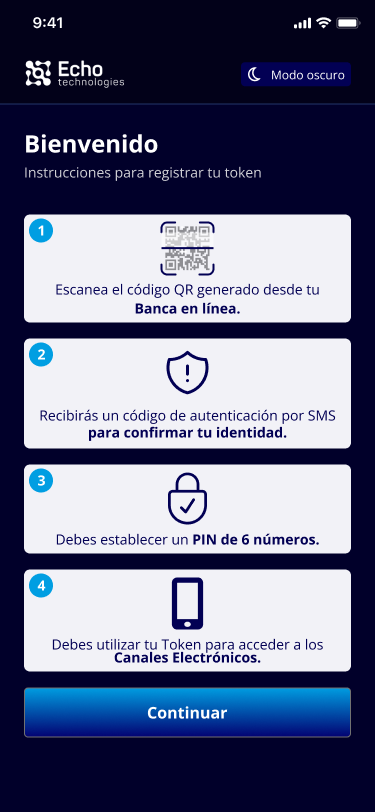
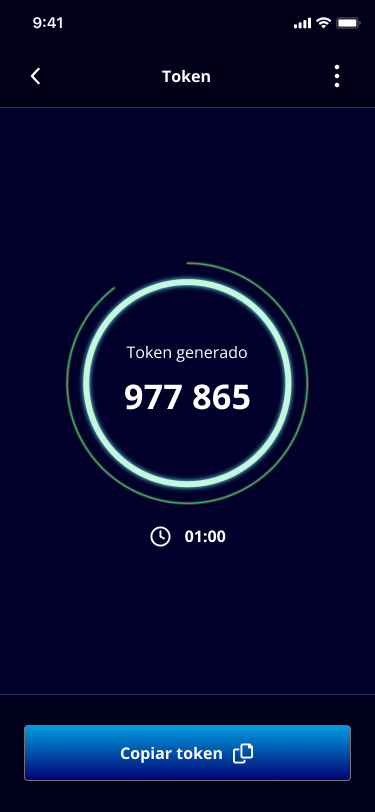
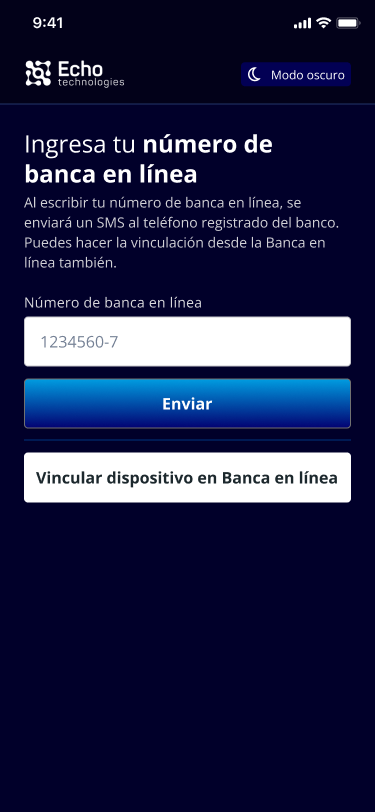
This is FACTOR in action.
REAL PRODUCT
Clear 4-step onboarding for end users
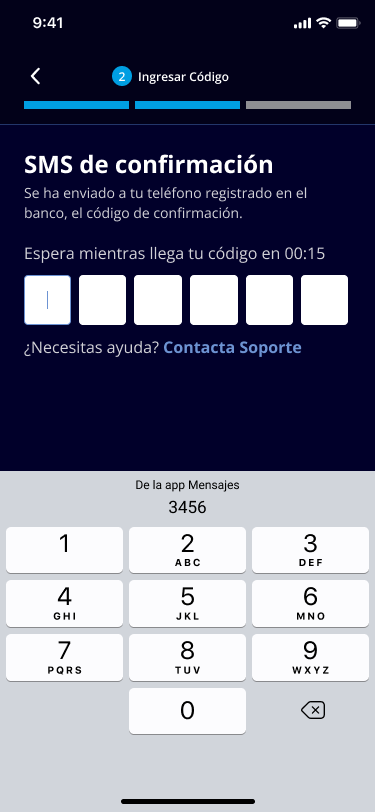
Real-time identity confirmation via SMS
6-digit token generated directly on the device
Your biggest security risk does not come from your system. It comes from your customer.
THE PROBLEM
Social engineering is the most successful attack in digital banking across Central America. And SMS OTP no longer stops the attacker.
Social engineering
Social engineering
An attacker calls your customer pretending to be the bank and collects their credentials. Without a second factor, that call is enough to empty the account.
Interceptable SMS OTP
Interceptable SMS OTP
The code that arrives by SMS can be redirected via SIM swapping or compromised at the carrier level. It is not a reliable security layer.
Authenticators without your brand
Authenticators without your brand
Google Authenticator does not carry your logo, is not configurable, and only offers QR enrollment. With FACTOR, your institution decides the activation method based on your customers’ profile.
From the link to the first code in under 2 minutes.
HOW IT WORKS
01
Activation link
The institution sends an activation link to the user’s email or SMS. One tap — no complicated instructions.
02
FACTOR activates
The user activates FACTOR via activation link or QR code, as your institution configures. In both cases, the app carries your visual identity.
03
Done in 2 minutes
The entire process takes under 2 minutes. The customer now has an authenticator branded to their institution.
04
OTP for every operation
For every login or sensitive transaction: FACTOR generates a 6-digit OTP code directly on the device.
Why FACTOR and not a generic authenticator?
DIFFERENTIATORS
Compare FACTOR with the most common alternatives — and see why financial institutions in El Salvador, Guatemala and Panama choose it.
| Feature | FACTOR | Google Auth | SMS OTP | Physical Token |
|---|---|---|---|---|
| Your brand & logo | ✅ | ❌ | ❌ | ✅ |
| QR-free enrollment available | ✅ | ❌ | ✅ | ✅ |
| No per-message cost | ✅ | ✅ | ❌ | ✅ |
| Configurable per op. | ✅ | ❌ | ❌ | ❌ |
| On-device code gen. | ✅ | ✅ | ❌ | ✅ |
| API integration | ✅ | ❌ | Limited | Limited |
CASE STUDY — COMEDICA
A financial institution already protecting its channels with FACTOR.
Two-factor authentication for online banking users. Frictionless enrollment, branded with the institution’s identity. Support teams stopped receiving calls from customers lost in the process.
Comedica — Savings and Credit Cooperative, El Salvador
FACTOR protects any digital channel that handles sensitive data.
WHO IS IT FOR
- Banks and credit unions with online banking platforms
- Fintech companies with payment or transfer apps
- Government institutions with citizen-facing portals
- Healthcare organizations with digital patient records
- Any institution that wants to eliminate the password as the only security factor
Everything you need to know before talking to our team
FAQ
Does FACTOR replace my current authentication system?
No. FACTOR integrates via API as an additional layer on top of your existing platform. It does not replace your core banking system or login mechanism.
Can FACTOR be used with or without a QR code?
Yes. FACTOR supports enrollment via activation link and via QR code. Your institution configures which method to use based on your customers’ profile. Link-based enrollment is especially useful for users who are not familiar with QR codes.
Can I apply my institution's visual identity?
Yes. FACTOR is fully white-label. Users download an app with your institution’s name and colors. They never see Echo Technologies’ brand.
Do the codes work without an internet connection?
Yes. OTP codes are generated locally on the device. No active connection required to authenticate. Only the initial enrollment requires internet.
The second factor your customers will actually use.
Yes. You can configure FACTOR for login only, transfers above a certain amount, sensitive data changes, or all operations — based on your institution’s security policy.
BOOK YOUR DEMO
Put your brand on the second authentication factor.
Book a 30-minute session and we will show you how FACTOR integrates with your current platform. No replacement, no friction for your team.
- El Salvador: Banks, credit unions and fintech
- Guatemala: Financial institutions and corporate portals
- Panama: SBP compliance and secure digital channels